By Elton Jones
Here’s a primer on everything there is to know about Google’s AI-powered research and note-taking companion
For those of you who interact with AI chatbots daily, we’re sure you use them as a tool to aid you in studying and researching.
ChatGPT, Gemini, Claude, Perplexity, and other similar AI models are known for providing the information you seek when you present them with questions about whatever topics you’re most focused on. Google offers something a bit more reliable when it comes to doing proper research on subjects both big and small. NotebookLM, which was originally codenamed “Project Tailwind,” is the tech giant’s signature AI-powered research and note-taking assistant. Not only does it search the web for legit sources of information, but it also lifts data from the documents you choose to upload.
To learn more about that NotebookLM process and the rest of its impressive capabilities, be sure to put this how-to guide to good use.
NotebookLM is a powerful AI research tool — here’s why
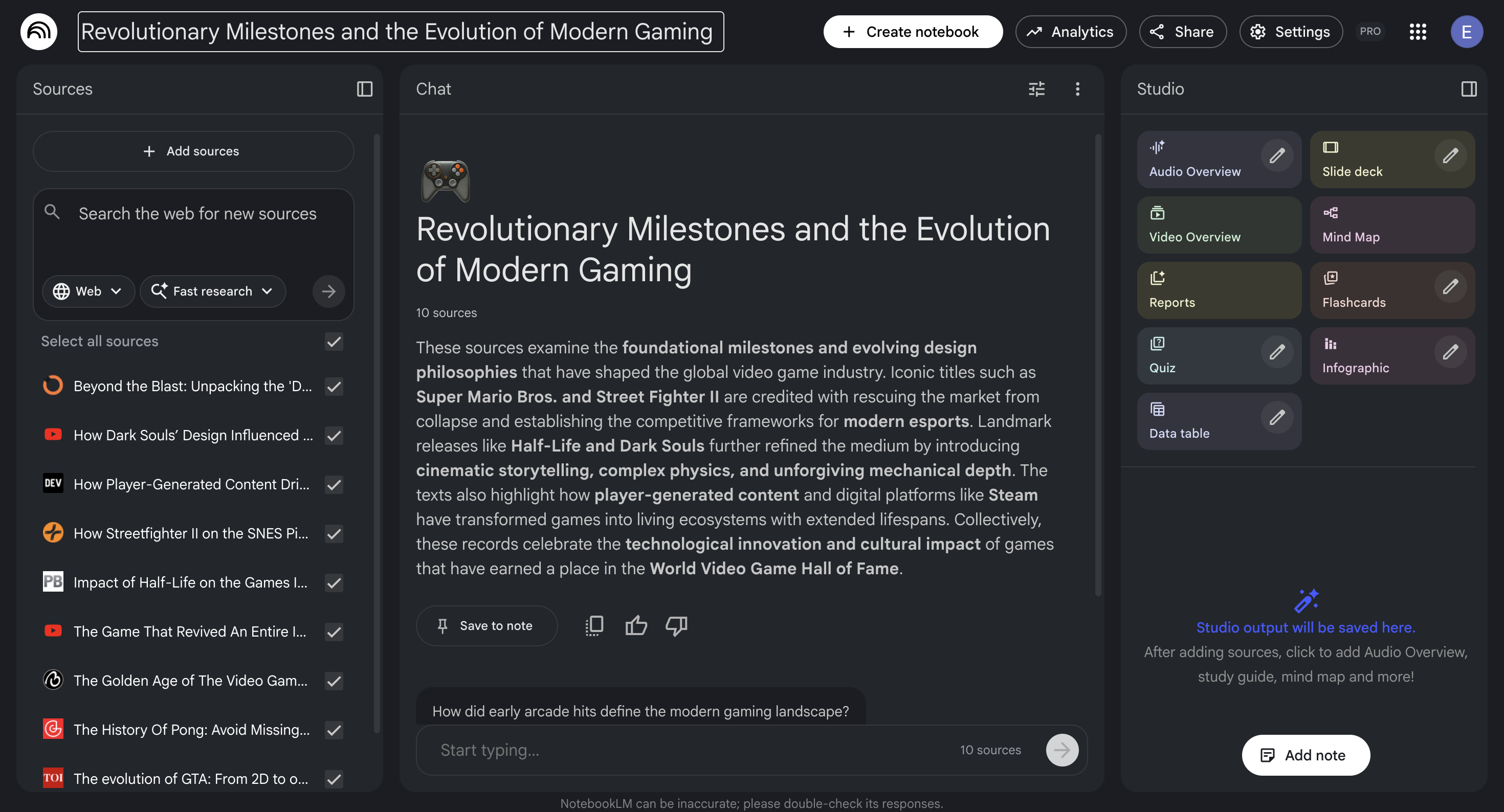
Powered by Google’s Gemini AI, NotebookLM works as a digital research assistant that can gather and analyze information from the web as well as content you upload from Google Drive.
You can choose Fast Research for quick answers or use Deep Research for a more comprehensive report. Featured notebooks from news organizations, researchers and Google itself showcase how the tool can compile research across topics like biology, arts and culture and parenting.
To start, create a new notebook and enter a question. For example, I asked: “What are the most influential video games of all time?” NotebookLM returned a concise summary backed by 10 cited sources, along with suggested follow-up questions to deepen the research. In addition to pulling information from the web, it can analyze files you upload — including PDFs, documents, images and audio — to surface relevant insights.
What makes NotebookLM especially compelling is how it transforms raw research into formats suited for different audiences. Its Studio feature can turn your notes into an audio overview presented as a podcast-style conversation between two AI hosts, or generate a video overview for quick sharing.
NotebookLM can also convert your research into a slide deck, mind map, detailed report, flashcards, infographic, data table or quiz — making it easy to repurpose information for presentations, studying or team collaboration.
NotebookLM is a great AI tool for several practical uses
In the following cases, NotebookLM excels at what it does:
- Prepping for exams: by generating summaries and creating flash cards, students can better prepare for upcoming tests and easily identity their weakest areas
- Producing a long-form article or white paper: comparing documents & sources, extracting their most crucial information, and pulling the best quotes is incredibly useful for writers looking to craft a more structured long-form piece of writing or white paper document
- Meeting breakdowns: uploading meeting transcripts and PowerPoint presentations can help NotebookLM generate better summaries, find actionable items, and zero in on the decisions & follow-ups that were decided upon
So how much does it cost?
If you have a Google account, NotebookLM is completely free. It’s also free for one year through a Free Pro Plan for students that use Google Gemini. The free tier has the following usage limits:
- 100 Notebooks
- 50 sources per notebook
- 50 chats per day
- 3 audio overviews per day
- 3 video overviews per day
- 10 reports per day
- 10 flashcards per day
- 10 quizzes per day
- No limits on the use of mind maps
- 10 uses of deep research a month
- Limited use of data tables
- Limited use of infographics
- Limited use of slide decks and revisions
Signing up for a Google AI Plus plan via the Plus Pro, or Ultra plans gives you bigger usage limits for your NotebookLM usage, which are explained below:
- NotebookLM in Plus: 200 Notebooks, 100 sources per notebook, 200 chats per day, 6 audio overviews per day, 6 video overviews per day, 20 reports per day, 20 flashcards per day, 20 quizzes per day, no limits on the use of mind maps, 3 uses of deep research per day, extended usage of data tables, extended usage of infographics, and extended usage of the slide decks and revisions.
- NotebookLM in Pro: 500 Notebooks, 300 sources per notebook, 500 chats per day, 20 audio overviews per day, 20 video overviews per day, 100 reports per day, 100 flashcards per day, 100 quizzes per day, no limits on the use of mind maps, 20 uses of deep research per day, more extended usage of data tables, more extended usage of infographics, and more extended usage of the slide decks and revisions.
- NotebookLM in Ultra: 500 Notebooks, 600 sources per notebook, 5000 chats per day, 200 audio overviews per day, 200 video overviews per day, 1000 reports per day, 1000 flashcards per day, 1000 quizzes per day, no limits on the use of mind maps, 200 uses of deep research per day, more extended usage of data tables, more extended usage of infographics, and more extended usage of the slide decks and revisions.
Bottom line
NotebookLM has proven itself as one of the most dependable AI tools for research and note-taking. It doesn’t replace your ability to compile information—it amplifies it by reducing the extra work that comes with organizing your notes and taking the most important bullet notes from a flood of essential material gathered from the web and your personal files.
In a world where information flows fast and free, NotebookLM offers everyone a better way you understand it better alongside your own statistics.
Source: Tom’s Guide
Leave a Reply